with all the telemetry going on- which is letting out your information to whoever, once again we would have to recommend that you run this program on your windows 7-8-10 computers...this program is from the makers of Spybot Search and Destroy....
Spybot Anti-Beacon...its free ...read here from the folks at Safer Networking
Why do I need anti-telemetry?
We at Safer-Networking Ltd respect Microsoft’s wish to get feedback from users to improve their operating system, but we firmly believe it is the user’s right to choose how much of their data they wish to share.
While Microsoft have included the ability to disable certain telemetry options in Windows 10, it can be quite difficult to disable all of these manually. For this reason, we have created a tool that will do this with the click of a button, and can be updated to include telemetry additions added by Microsoft in the future.
Go to the website to download and run it HERE
Wednesday, November 4, 2015

Monday, October 5, 2015
Here we go again- Stagefright app for Android....get it from the Play Store
What is it?
A great big Android vulnerability problem....
so to check your phone to see if you have not been protected
click HERE
As a precaution go into your messaging apps and disable "auto retrieval"
that will help the problem not necessarily stopping it altogether....
Read all about it HERE from Emisoft
A great big Android vulnerability problem....
so to check your phone to see if you have not been protected
click HERE
As a precaution go into your messaging apps and disable "auto retrieval"
that will help the problem not necessarily stopping it altogether....
Read all about it HERE from Emisoft
Monday, September 21, 2015
Get rid of your subscriptions in GMail quickly...here's how
Meet Unroll.me, a free
tool helping to organize your subscriptions in minutes! You will be amazed how many you really have coming into your email...... After you sign
up, see a list of all your subscription emails. Unsubscribe instantly
from whatever you don’t want.
Sunday, September 13, 2015
How to uninstall the Windows 10 Free Upgrade update if you don't want it...here's how
- Open Windows Update by going to Control Panel -> System and Security -> Windows Update, or search for it.
- Click on Installed Updates on the bottom left corner.
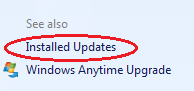
- Locate and select the Update for Microsoft Windows (KB3035583) update under Microsoft Windows section. You can search for KB3035583in the search box on top left corner.
- Click on Uninstall to remove the update.
- Click Yes to confirm.
- When uninstallation process is completed, restart the computer.
- Uninstall Update for Microsoft Windows (KB2976978) also if the Get Windows 10 app is not removed completely.
Wednesday, September 9, 2015
How to install Kodi to a Linux Distribution
Open Terminal
then type in each of these commands one at a time:
then type in each of these commands one at a time:
sudo apt-get install software-properties-common
sudo add-apt-repository ppa:team-xbmc/ppa
sudo apt-get update
sudo apt-get install kodi
Sunday, September 6, 2015
Videos automatically playing in Firefox? disable this permanently.....here's how
To change this setting, type about:config into Firefox’s address bar and
press Enter. You will see a warning ..hit agree and then type “autoplay” into the
search box. You’ll see a preference named “media.autoplay.enabled”,
which will be set to True. Double-click that preference and it will
change to False.
that will reset Firefox so it won't autoplay all those videos that are on websites and waste your bandwidth etc....
that will reset Firefox so it won't autoplay all those videos that are on websites and waste your bandwidth etc....
Friday, September 4, 2015
Want your privacy? hmmmm recapture a bit of it.....
Windows 10 has brought out to view the privacy concerns of many. Now it appears via PC WORLD
article that even Windows 7 and 8 have updates waiting to be installed that will further those concerns....
Here is 4 of them that if you are concerned you should either not install them, as they are recommended updates or if they are already installed you should uninstall them and HIDE them from appearing again....
Here's how..... head to Control Panel > Programs > Uninstall or change a program. Here, click View installed updates in the left-hand navigation pane. In the search box in the upper-right corner, search for the KB3068708, KB3022345, KB3075249, and KB3080149 updates by name. If they’re installed, they’ll pop right up. If you find one, right-click on it and select Uninstall to wipe it from your system.
Then go to Windows Update and if you see updates waiting to be installed and you also see these updates in the recommended update window right click on each one and hit HIDE....
Also please turn off AUTOMATIC UPDATING....you want to set it to Check for updates only and to notify you so you have the option of YES OR NO..
also MS Office has tracking capabilities....
If you use Office’s default settings, it signs you up for Microsoft's CEIP. How-to Geek has a tutorial explaining how to disable it, though if sending information to Microsoft before didn’t bother you, this new update probably won’t either.
Some of this information is courtesy of PC WORLD today....HERE
article that even Windows 7 and 8 have updates waiting to be installed that will further those concerns....
Here is 4 of them that if you are concerned you should either not install them, as they are recommended updates or if they are already installed you should uninstall them and HIDE them from appearing again....
Here's how..... head to Control Panel > Programs > Uninstall or change a program. Here, click View installed updates in the left-hand navigation pane. In the search box in the upper-right corner, search for the KB3068708, KB3022345, KB3075249, and KB3080149 updates by name. If they’re installed, they’ll pop right up. If you find one, right-click on it and select Uninstall to wipe it from your system.
Then go to Windows Update and if you see updates waiting to be installed and you also see these updates in the recommended update window right click on each one and hit HIDE....
Also please turn off AUTOMATIC UPDATING....you want to set it to Check for updates only and to notify you so you have the option of YES OR NO..
also MS Office has tracking capabilities....
If you use Office’s default settings, it signs you up for Microsoft's CEIP. How-to Geek has a tutorial explaining how to disable it, though if sending information to Microsoft before didn’t bother you, this new update probably won’t either.
Some of this information is courtesy of PC WORLD today....HERE
Wednesday, September 2, 2015
Black screen when logging into remote desktop client? here's how to fix that....
when you login to your remote desktop client and the screen is black even though you show the IP address up on top....here's what to do
CTRL>ALT>END
and when the task manager pulls up hit LOCK
then hit UNLOCK...
this will close out the session and reload it again with your password being entered again of course...
it is stuck in a loop likely or has had multiple login attempts and has to be completely logged out and reopened again to a fresh screen.....
CTRL>ALT>END
and when the task manager pulls up hit LOCK
then hit UNLOCK...
this will close out the session and reload it again with your password being entered again of course...
it is stuck in a loop likely or has had multiple login attempts and has to be completely logged out and reopened again to a fresh screen.....
Tuesday, August 25, 2015
Keep safe in the Web World with Text Secure.....here's how
Private messaging for Android and Apple...it's free, encrypted and safe for you in this wide open web world.
Check it out on the Google Play for Android or the AppStore
Check it out on the Google Play for Android or the AppStore
Sunday, August 9, 2015
Lose internet after uninstalling VPN (ie Hotspot Shield or others)? Here's how to get it back.....
Control Panel
Network Connections
Go to left side of window to "change adapter settings"
right click on "local area connection"
go down to "Internet protocol version 4"
click on "properties"
make sure "obtain IP address automatically" is ticked
also "obtain DNS server address automatically" is ticked.
exit out of it and your internet has returned to normal!
Network Connections
Go to left side of window to "change adapter settings"
right click on "local area connection"
go down to "Internet protocol version 4"
click on "properties"
make sure "obtain IP address automatically" is ticked
also "obtain DNS server address automatically" is ticked.
exit out of it and your internet has returned to normal!
Tuesday, August 4, 2015
Disable Windows 10 calling back Home .... keep privacy as much as possible in the Net world.....
When you get to the screen GET GOING FAST....
Click on CUSTOMIZE SETTINGS in small letters down at the bottom when you are going through the settings for setup and into PRIVACY and read through all the items there....untick everything that you don't think you want going out to the world of Microsoft.....
PERSONALIZATION--TICK ALL TO OFF
BROWSER AND PROTECTION- TICK ALL TO OFF EXCEPT SMART SCREEN
These are the main two....check all your settings
keeping safe as possible in the Web World these days.....
again I recommend Firefox for your browsing and limit ads with adblocker plugin and also disable stuff on
Google privacy settings.....
Click on CUSTOMIZE SETTINGS in small letters down at the bottom when you are going through the settings for setup and into PRIVACY and read through all the items there....untick everything that you don't think you want going out to the world of Microsoft.....
PERSONALIZATION--TICK ALL TO OFF
BROWSER AND PROTECTION- TICK ALL TO OFF EXCEPT SMART SCREEN
These are the main two....check all your settings
keeping safe as possible in the Web World these days.....
again I recommend Firefox for your browsing and limit ads with adblocker plugin and also disable stuff on
Google privacy settings.....
Subscribe to:
Posts (Atom)